Key capabilities
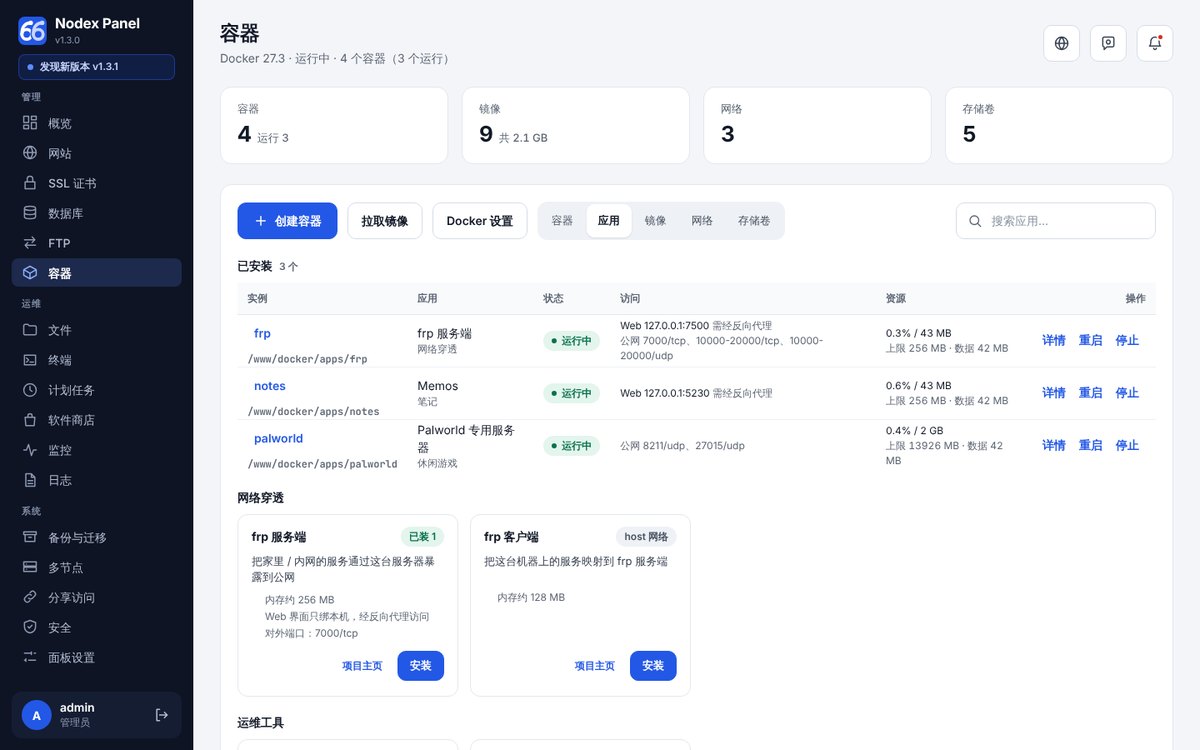
Docker and one-click apps
Manage Docker containers, images, networks and volumes in your browser. Install frp, Memos, New API, Uptime Kuma, Palworld and more in one click, with port, memory and disk checks before installing and automatic backups before upgrades.
Full container management
Create, start and stop containers, view logs, open a terminal and set resource limits; missing images are pulled automatically with progress.
One-click apps
frp, Memos, New API, ddns-go, Uptime Kuma, plus game servers such as Palworld and MCSManager.
Pre-install checks
Ports, memory and disk space are checked automatically, and strong passwords are generated for you.
Resource caps and log rotation
Every app has memory / CPU caps and log rotation, so it can't overload the server or fill the disk.
Upgrades you can undo
You are told about new versions, a backup is taken before upgrading, and the previous version is restored if the new one fails to start.
Cleanup
Remove unused images and containers in one click to free disk space.
Quick start
Get started in three steps
Nothing to preinstall: one command installs the panel, and everything after that happens in your browser.
- 1
Install Docker
Install Docker from the Software Store in one click, with sensible defaults such as log size limits.
- 2
Choose an app
Pick an app under Containers → Apps and fill in the port and settings.
- 3
Open it
When it's installed, click Visit to open it, or bind a domain and certificate.
Installation
One command to install
Works on fresh or minimal installs of mainstream Linux distributions in about a minute; later upgrades happen automatically and roll back on failure.
command -v curl >/dev/null 2>&1 || { command -v apt-get >/dev/null 2>&1 && apt-get update -qq && apt-get install -y -qq curl ca-certificates || dnf install -y -q curl || yum install -y -q curl; }; d=$(mktemp -d) && curl -fsSL 'https://www.66panel.com/install.sh' -o "$d/install.sh" && bash "$d/install.sh"; s=$?; rm -rf "$d"; [ $s -eq 0 ]Do game servers save automatically?
Game servers such as Palworld support scheduled restarts and save the world before restarting.
Will upgrading an app lose data?
A backup and configuration snapshot are taken before upgrading, and the previous version is restored if the new one fails. For database apps, major-version upgrades come with manual migration steps.
Can I open a terminal inside a container?
Yes. Both containers and apps can open a terminal directly and show live logs.
Related features
Keep exploring
Multi-server management
As your fleet grows, stop logging in to servers one by one: resources, alerts and actions come together in one place.
Learn more →Backup and migration
Backups shouldn't depend on memory: scheduled archives, automatic cleanup of old backups and copies to remote storage, plus one-click restore on a new server.
Learn more →Server hardening
No hardening manual required: the common attack surface is closed right after installation, and the rest are one-click switches.
Learn more →Try it on a server now
One command, about a minute; later upgrades happen automatically and roll back on failure.