Key capabilities
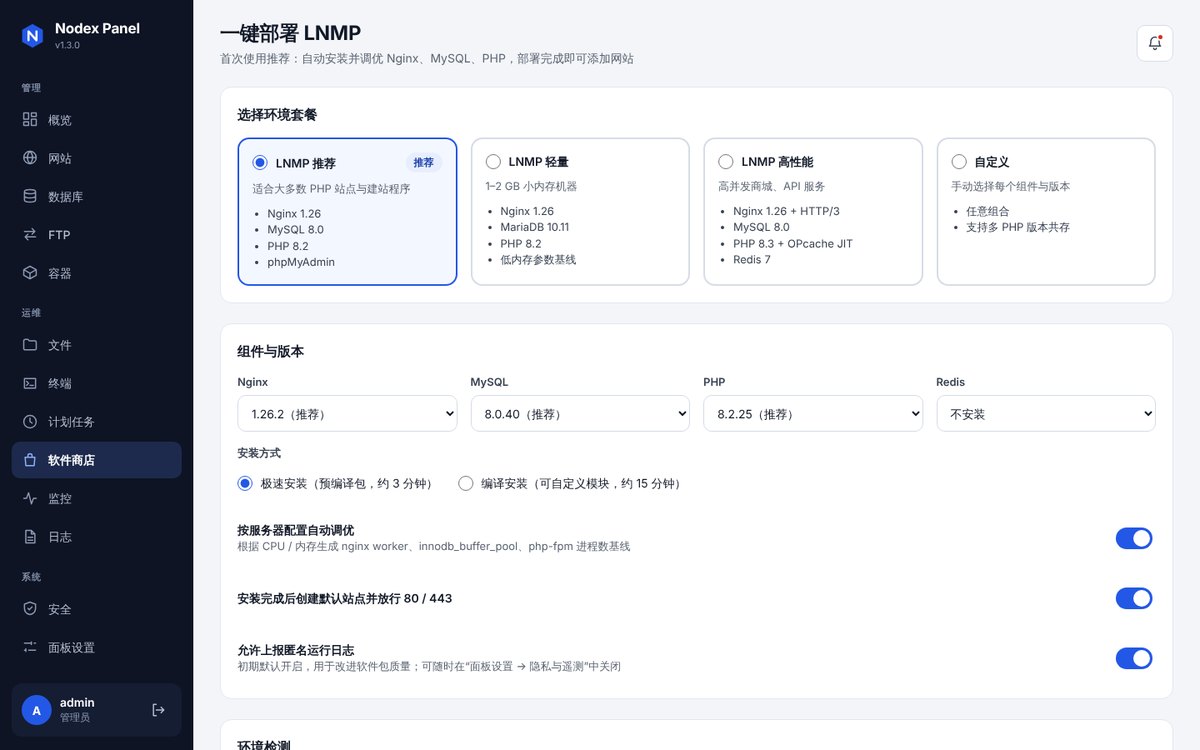
One-click LNMP / LAMP
Install Nginx or Apache, MySQL / MariaDB and PHP in one click, tuned automatically to your server's memory, with live progress. Works on Debian, Ubuntu, Rocky Linux, AlmaLinux and other mainstream Linux distributions.
Nginx or Apache, your choice
LNMP uses Nginx (or OpenResty); LAMP uses Apache + PHP-FPM and supports .htaccess rewrite rules.
Tuned to your memory
The MySQL buffer pool, PHP worker count and web server workers are sized by memory and disk type, so large servers are not held back.
Mix and match versions
Several built-in stack templates, PHP 5.2 – 8.5 side by side, and a choice of MySQL and MariaDB release lines.
See every step
Progress and logs are shown live and can be reviewed later; failures explain the cause and how to fix it.
Patch reminders
You are told when installed software has a patch or security update; update in one click, and the previous version is restored automatically if something goes wrong.
Both major Linux families
apt on Debian / Ubuntu, dnf on Rocky / AlmaLinux / CentOS Stream / RHEL, and installs can safely be run again.
Quick start
Get started in three steps
Nothing to preinstall: one command installs the panel, and everything after that happens in your browser.
- 1
Install the panel
Run the one-line command as root; the panel is ready in about a minute.
- 2
Choose a stack
Sign in, open One-click Deploy, and pick LNMP or LAMP, a template and versions.
- 3
Start building
Once installed, add websites, databases and SSL certificates right away.
Installation
One command to install
Works on fresh or minimal installs of mainstream Linux distributions in about a minute; later upgrades happen automatically and roll back on failure.
command -v curl >/dev/null 2>&1 || { command -v apt-get >/dev/null 2>&1 && apt-get update -qq && apt-get install -y -qq curl ca-certificates || dnf install -y -q curl || yum install -y -q curl; }; d=$(mktemp -d) && curl -fsSL 'https://www.66panel.com/install.sh' -o "$d/install.sh" && bash "$d/install.sh"; s=$?; rm -rf "$d"; [ $s -eq 0 ]Should I choose LNMP or LAMP?
Most websites should choose LNMP: Nginx uses fewer resources and handles concurrency better. Choose LAMP for applications that rely on .htaccess rules. Ports 80 / 443 on a server are served by a single web server.
How much memory does the server need?
2 GB or more is recommended for LNMP. 1 GB also works: the panel lowers each component's footprint to match the memory.
Can I change versions later?
Yes. Switch release lines or add more PHP versions in the Software Store, and the previous version is restored automatically if something goes wrong. Database upgrades convert the data files and cannot be rolled back, so back up first.
Related features
Keep exploring
Websites and app deployment
Creating a site generates the web server config, directories and logs for you. PHP sites, static sites, reverse proxies and apps in any language are managed in one list.
Learn more →Database management
Everyday database work without typing SQL: databases, users, permissions, backups and imports on one page.
Learn more →Free SSL certificates
HTTPS takes one click: the panel requests, deploys and renews the certificate. Without port 80, or for wildcard domains, it uses DNS validation instead.
Learn more →Try it on a server now
One command, about a minute; later upgrades happen automatically and roll back on failure.