Key capabilities
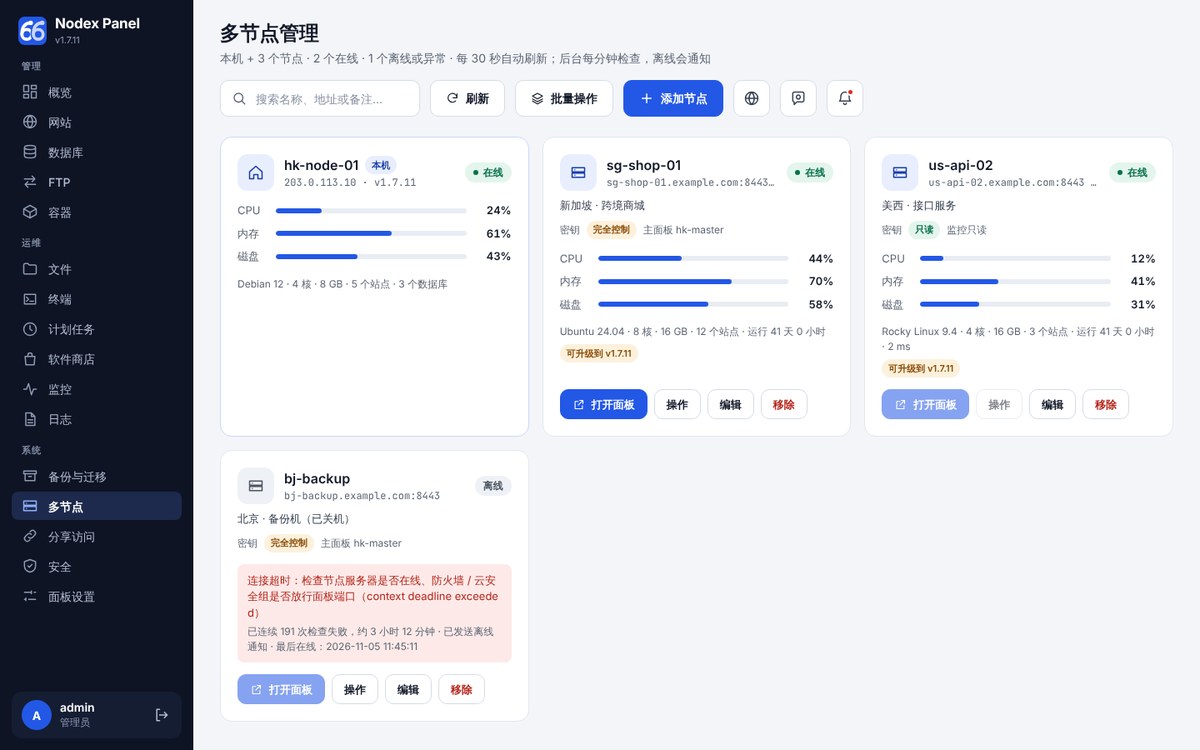
Multi-server management
See resources, versions and status for many servers in one panel, sign in to any node in one click, run batch actions and send files between nodes, plus website sync, load balancing and MySQL replication.
One view
CPU, memory, disk, status and panel version for every server at a glance, with an alert when a server goes offline.
One-click sign-in
Jump from the node list into any server's panel without remembering its address and password.
Batch actions
Restart services, panels or servers in bulk, and send files between nodes.
Node sync
Sync websites, SSL certificates and files to other nodes; the target server creates the sites through its normal workflow.
Load balancing
Distribute HTTP / TCP / UDP traffic across several nodes.
Separate keys
Each node has its own key that can be limited to read-only, source IPs and an expiry date, and revoked at any time.
Quick start
Get started in three steps
Nothing to preinstall: one command installs the panel, and everything after that happens in your browser.
- 1
Install the panel on each server
Run the same one-line command on each server.
- 2
Add nodes
In the main panel, enter each node's address and key under Nodes.
- 3
Manage centrally
From then on, view, sign in to and act on every server from one page.
Installation
One command to install
Works on fresh or minimal installs of mainstream Linux distributions in about a minute; later upgrades happen automatically and roll back on failure.
command -v curl >/dev/null 2>&1 || { command -v apt-get >/dev/null 2>&1 && apt-get update -qq && apt-get install -y -qq curl ca-certificates || dnf install -y -q curl || yum install -y -q curl; }; d=$(mktemp -d) && curl -fsSL 'https://www.66panel.com/install.sh' -o "$d/install.sh" && bash "$d/install.sh"; s=$?; rm -rf "$d"; [ $s -eq 0 ]How do nodes communicate?
Over HTTPS through each node's panel API, with a separate key per node that can be limited to read-only, source IPs and an expiry date.
Will I be notified when a node goes offline?
Yes. You are alerted through the channels you set up, such as email, webhooks or Telegram.
Can I sync only some websites?
Yes. Node sync only touches the sites you select; other websites on the target server are left alone.
Related features
Keep exploring
Backup and migration
Backups shouldn't depend on memory: scheduled archives, automatic cleanup of old backups and copies to remote storage, plus one-click restore on a new server.
Learn more →Docker and one-click apps
No docker commands to memorize: containers, images, networks and volumes all have full pages, common services install in one click, resources are capped and crashed apps restart.
Learn more →Server hardening
No hardening manual required: the common attack surface is closed right after installation, and the rest are one-click switches.
Learn more →Try it on a server now
One command, about a minute; later upgrades happen automatically and roll back on failure.