Key capabilities
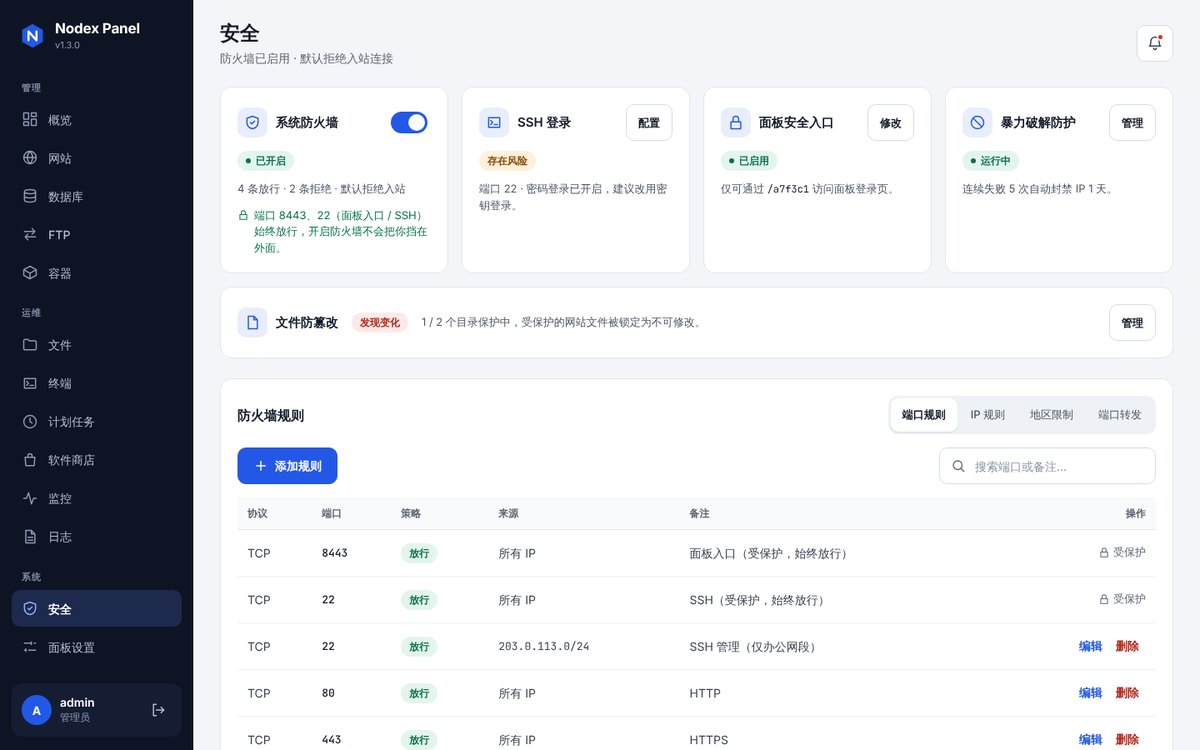
Server hardening
A deny-by-default firewall, SSH brute-force protection, kernel-level website tamper protection, a WAF, a random secure entrance and two-factor authentication. Port changes are protected by rollback, so you never lock yourself out.
Deny-by-default firewall
Allow by port and IP on ufw / firewalld / nftables automatically; the panel and SSH ports are always allowed first.
SSH brute-force protection
IPs with repeated failed logins are banned automatically; review SSH logins at any time and block an IP in one click.
Website tamper protection
Website directories are locked read-only by the kernel, upload and cache directories are excluded automatically, and failures roll back completely.
Web application firewall
The OpenResty WAF blocks common web attacks such as SQL injection and XSS.
Panel access control
A random secure entrance, two-factor authentication with recovery codes and lockout after failed logins; you can also require a device certificate to open the panel.
Security update alerts
You are alerted when installed software has a known vulnerability, and security updates can install automatically in a time window you choose.
Quick start
Get started in three steps
Nothing to preinstall: one command installs the panel, and everything after that happens in your browser.
- 1
On from the start
The firewall, secure entrance and random password are set up during installation.
- 2
Open ports as needed
Allow the ports your sites and apps need in the firewall, or restrict them to certain source IPs.
- 3
Turn on more protection
Enable tamper protection and the WAF for websites, and two-factor authentication for the panel.
Installation
One command to install
Works on fresh or minimal installs of mainstream Linux distributions in about a minute; later upgrades happen automatically and roll back on failure.
command -v curl >/dev/null 2>&1 || { command -v apt-get >/dev/null 2>&1 && apt-get update -qq && apt-get install -y -qq curl ca-certificates || dnf install -y -q curl || yum install -y -q curl; }; d=$(mktemp -d) && curl -fsSL 'https://www.66panel.com/install.sh' -o "$d/install.sh" && bash "$d/install.sh"; s=$?; rm -rf "$d"; [ $s -eq 0 ]Can a firewall change lock me out?
No. The panel and SSH ports are protected and always allowed first; a panel port change only takes effect after you confirm it, and is undone automatically if you can't connect.
Can I still update a site with tamper protection on?
Yes. Pause it temporarily and it turns back on automatically; upload and cache directories are excluded by default, so normal writes keep working.
What if I forget the secure entrance?
Use the nodex command line as root on the server to show the entrance and address or reset the password. It works even when the firewall is blocking you.
Related features
Keep exploring
Free SSL certificates
HTTPS takes one click: the panel requests, deploys and renews the certificate. Without port 80, or for wildcard domains, it uses DNS validation instead.
Learn more →Backup and migration
Backups shouldn't depend on memory: scheduled archives, automatic cleanup of old backups and copies to remote storage, plus one-click restore on a new server.
Learn more →Multi-server management
As your fleet grows, stop logging in to servers one by one: resources, alerts and actions come together in one place.
Learn more →Try it on a server now
One command, about a minute; later upgrades happen automatically and roll back on failure.