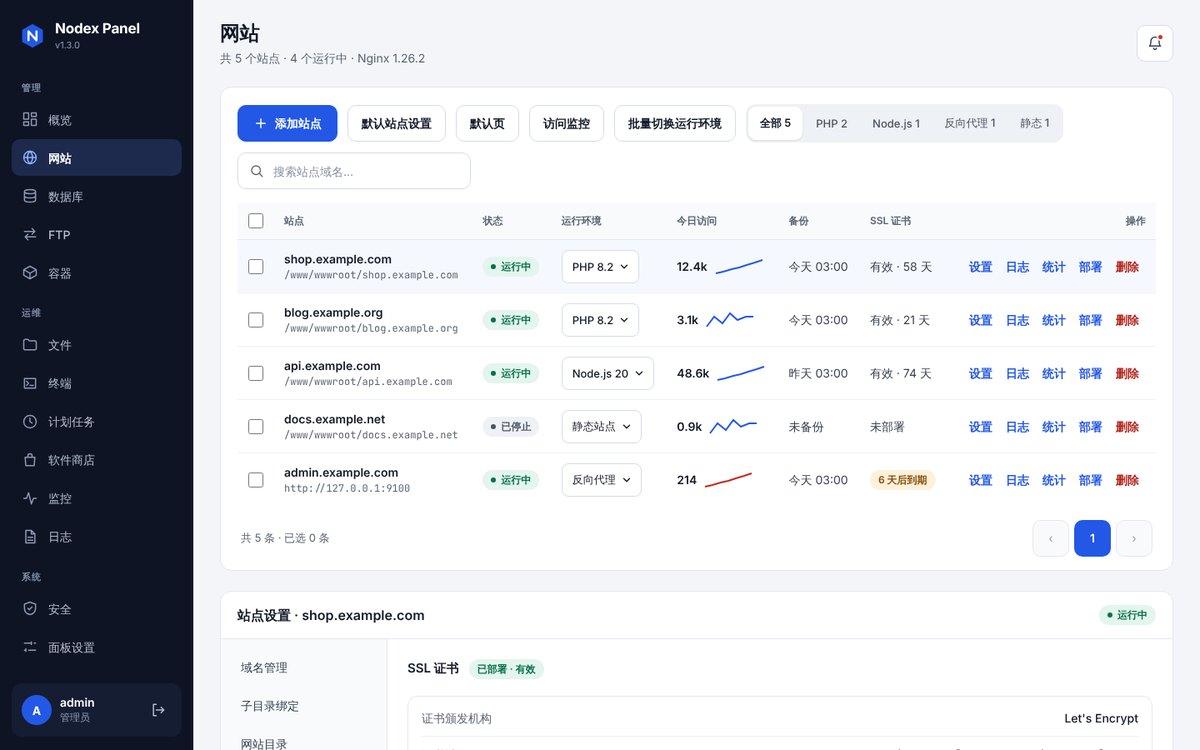
Key capabilities
Free SSL certificates
Get free Let's Encrypt SSL certificates in one click with automatic renewal. Supports wildcard domains and DNS validation (no port 80 needed), or deploy your own certificate. You are notified if a renewal fails.
One-click issuance
Free Let's Encrypt certificates, written into the site config with HTTPS enabled as soon as they are issued.
Automatic renewal
Renewed automatically before expiry; if renewal fails you get a notification with the reason. No cron jobs to write.
DNS validation and wildcards
Connect Alibaba Cloud DNS, Tencent Cloud DNSPod, Cloudflare or Huawei Cloud DNS to get wildcard certificates without opening port 80.
Bring your own certificate
Already have a certificate? Paste the certificate and private key to deploy it, with the same expiry reminders.
Force HTTPS
HTTP requests are redirected to HTTPS, and domains with a port can serve HTTPS directly on that port.
HTTPS for the panel itself
The panel can use a Let's Encrypt certificate too; if anything goes wrong it falls back to its self-signed certificate, so you are never locked out.
Quick start
Get started in three steps
Nothing to preinstall: one command installs the panel, and everything after that happens in your browser.
- 1
Add a site
Point the domain at the server, then add the site in the panel.
- 2
Request a certificate
Click Request in the site's SSL settings; choose DNS validation for wildcard domains.
- 3
Automatic renewal
From then on the panel handles renewals, so expiry is no longer your problem.
Installation
One command to install
Works on fresh or minimal installs of mainstream Linux distributions in about a minute; later upgrades happen automatically and roll back on failure.
command -v curl >/dev/null 2>&1 || { command -v apt-get >/dev/null 2>&1 && apt-get update -qq && apt-get install -y -qq curl ca-certificates || dnf install -y -q curl || yum install -y -q curl; }; d=$(mktemp -d) && curl -fsSL 'https://www.66panel.com/install.sh' -o "$d/install.sh" && bash "$d/install.sh"; s=$?; rm -rf "$d"; [ $s -eq 0 ]Are the certificates really free?
Let's Encrypt certificates are free and valid for 90 days; the panel renews them automatically before they expire.
Can I get a certificate without port 80?
Yes. Use DNS validation: connect your DNS provider under DNS, and the panel adds the validation record and removes it afterwards.
Are wildcard certificates supported?
Yes. Wildcard certificates require DNS validation; once your DNS provider is connected they can be issued and renewed.
Related features
Keep exploring
Websites and app deployment
Creating a site generates the web server config, directories and logs for you. PHP sites, static sites, reverse proxies and apps in any language are managed in one list.
Learn more →Server hardening
No hardening manual required: the common attack surface is closed right after installation, and the rest are one-click switches.
Learn more →One-click LNMP / LAMP
Pick LNMP (Nginx) or LAMP (Apache), a stack template and component versions. The panel installs step by step and tunes everything to your server's memory; every step is logged, and failures explain the cause and what to do next.
Learn more →Try it on a server now
One command, about a minute; later upgrades happen automatically and roll back on failure.