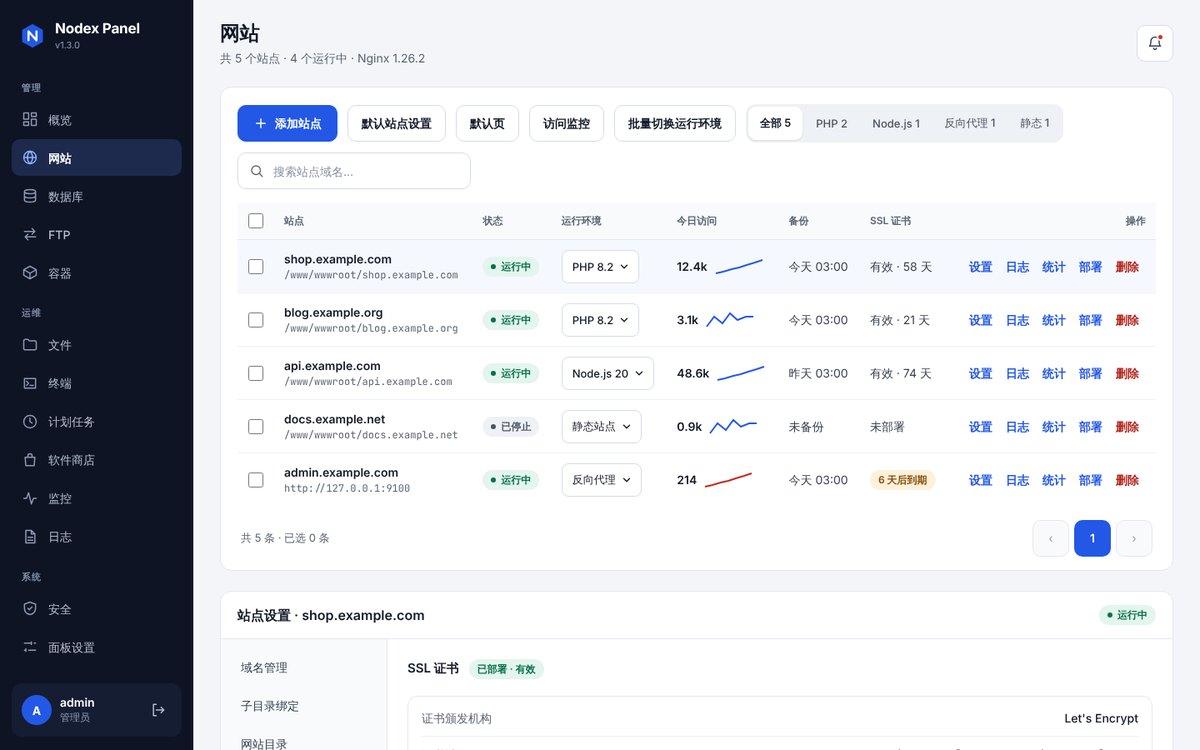
Key capabilities
Websites and app deployment
Create sites, bind multiple domains, and choose PHP versions and rewrite rules in the panel. Ship Node.js, Java, Go and Python apps and WAR files directly, with process supervision, start on boot and deploy on push.
Multiple PHP versions side by side
Choose PHP 5.2 – 8.5 per site, manage extensions per version, and give each site its own system user.
Rewrite rule templates
Built-in rewrite rules for popular applications; after picking a template you can view, edit and save it.
Ship apps directly
Node.js, Java, Go and Python apps and WAR files: process supervision, start on boot, automatic restart after crashes, and log rotation.
Deploy on push
Link a GitHub repository and every push is pulled and deployed automatically, with a record of each deployment.
Traffic statistics
Page views, unique visitors, bandwidth and regions from access logs, counted by the visitor's real IP even behind a CDN.
Quotas and expiry
Set an expiry date, disk quota and monthly traffic limit per site; sites are suspended automatically when exceeded, with a notification.
Quick start
Get started in three steps
Nothing to preinstall: one command installs the panel, and everything after that happens in your browser.
- 1
Add a site
Enter the domain and choose a site type: PHP, static, app or reverse proxy.
- 2
Configure the runtime
Choose the PHP version and a rewrite template, or enter the app's start command and port.
- 3
Turn on HTTPS
Request an SSL certificate in one click and the site is live over HTTPS.
Installation
One command to install
Works on fresh or minimal installs of mainstream Linux distributions in about a minute; later upgrades happen automatically and roll back on failure.
command -v curl >/dev/null 2>&1 || { command -v apt-get >/dev/null 2>&1 && apt-get update -qq && apt-get install -y -qq curl ca-certificates || dnf install -y -q curl || yum install -y -q curl; }; d=$(mktemp -d) && curl -fsSL 'https://www.66panel.com/install.sh' -o "$d/install.sh" && bash "$d/install.sh"; s=$?; rm -rf "$d"; [ $s -eq 0 ]Can one site have several domains?
Yes. Enter several domains when creating the site or add them at any time; a domain with a port is served directly on that port.
Can I deploy long-running apps such as Node.js or Go?
Yes. Enter the start command and port; the panel supervises the process, starts it on boot and keeps the logs. Bind a domain and certificate and it's live.
Can I edit website files in the panel?
Yes. The file manager handles uploads and downloads, archives, online editing and permissions; you can also use the web terminal or FTP.
Related features
Keep exploring
One-click LNMP / LAMP
Pick LNMP (Nginx) or LAMP (Apache), a stack template and component versions. The panel installs step by step and tunes everything to your server's memory; every step is logged, and failures explain the cause and what to do next.
Learn more →Free SSL certificates
HTTPS takes one click: the panel requests, deploys and renews the certificate. Without port 80, or for wildcard domains, it uses DNS validation instead.
Learn more →Server hardening
No hardening manual required: the common attack surface is closed right after installation, and the rest are one-click switches.
Learn more →Try it on a server now
One command, about a minute; later upgrades happen automatically and roll back on failure.